Skip to content

LinkedIn launches web and iPad app for your tablet

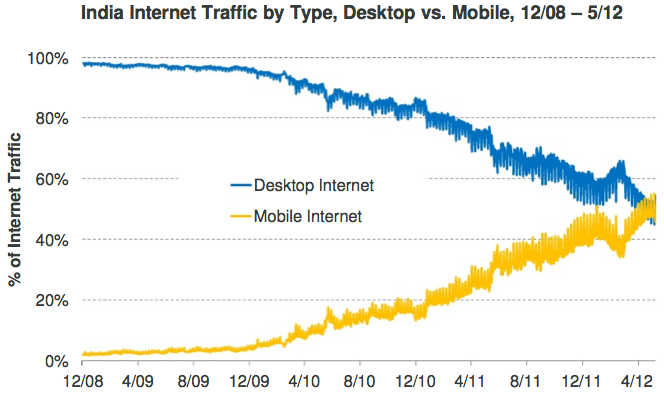
According to a recent Google survey of smartphone users 93% use their smartphones while traveling and more and more users today are accessing the internet from a mobile device than from a computer. Linkedin mobile page views are growing at 400% p.a. and mobile already accounts for 22% of page views and visits. However we had to wait for a better user experience on tablets until today as LinkedIn announced the release of the LinkedIn for iPad app!

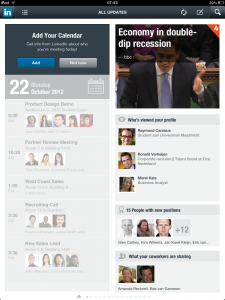
It’s an updated version of their iPhone app so there’s no need to download a special app, just update (or download) the LinkedIn app and install it on your iPad. You’ll notice that you’ll get almost the same experience as the iPhone app. But they did add an extra feature; calendar. The LinkedIn iPad app can sync with your device calendar to incorporate Linkedin profile data about each attendee to help you understand “who” you are meeting with. In my opinion the best feature is the LinkedIn News section where you can read about relevant topics from your network and the most popular topics in your field (similar to the very popular Flipboard news app). A lot of people will like also that the list of people who’ve looked at your profile is the first thing you’ll see in the profile section.

In addition to the iPad app, they also launched a new mobile web experience for the Safari browser on iPad. It has exactly the same features and look as the iPad app. Try it here: tablet.linkedin.com.


LinkedIn launches web and iPad app for your tablet

Download our Windows Phone 7 Apps

Recruitment news now also on Windows Phone 7 at your fingertips

Launching our Global Recruiting Roundtable WP7 App

Windows Phone 7 (WP7) users had to wait a bit longer than iPhone and Android user but they can now download our ‘Recruiters‘ App. Read the latest Employer Branding and Recruitment news and advice at your fingertips.It contains a large collection of expert articles and international news, in English and German language, from many blogs and sites around the globe and is FREE.

Search for Recruiters in the Windows Marketplace or download it here!

Recruitment news now also on Windows Phone 7 at your fingertips

12 Mobile Recruitment Applications (part 4)

In the past three articles I’ve described the latest developments in mobile recruitment. In Part 1 the explosion of mobile internet in the coming years and the evolution of online recruitment to mobile was reviewed. The implications of mobile devices and the required actions for HR / Recruitment Managers were described in part 2. In part 3 a short checklist was provided to see if your career site is ‘future proof’ for candidates visiting via a mobile device.

I will conclude here with some mobile solutions that show what already is technically possible to support your recruitment and selection process:

[slideshare id=9046189&doc=mobilerecruitingapplications-110828162145-phpapp02]

12 Mobile Recruitment Applications (part 4)

The Future Of Mobile Recruitment: Checklist (part 3)

In four articles I’ll describe the developments in mobile recruitment. In Part 1 the explosion of mobile internet in the coming years and the evolution of online recruitment to mobile was discussed. The implications of mobile devices and the required actions for HR / Recruitment Managers were described in part 2.

Here’s a quick checklist to see if your career site is ‘future proof’ for candidates visiting via a mobile device. Because they will do so! And in the near future they will do this more frequent and expect a good user experience. Therefore, be prepared and perform the following checklist.

The Future Of Mobile Recruitment: Checklist (part 3)

The Future Of Mobile Recruitment: implications (part 2)

In four articles I’ll describe the developments in mobile recruitment. In Part 1 the explosion of mobile internet in the coming years and the evolution of online recruitment to mobile was discussed. The implications of mobile devices and the required actions for HR / Recruitment Managers are being described in this article.

A mobile device such as smartphone or tablet typically has:

1.     Mobile internet

2.     Small Screen

3.     Location determination (GPS)

4.     Camera

What are the opportunities and challenges of recruitment of this? Let’s have a look at the impact and actions that are required. The Future Of Mobile Recruitment: implications (part 2)

Social Media counts

Popular social media platforms are amongst the most visited sites and, nowadays, one of the most popular activities on mobile phones. You’ve probably heard that before but what this REALLY means is shown in this amazing and hypnotic real time display of 48 user, content and business metrics across social media, games, mobile and traditional or heritage media. The data is based on actual reported numbers, which are listed in the embedded info panel, and this rolling ‘count-up counter’ is a projection forward in time based on these real numbers:

Social Media counts